27
Ramp Operations Software

Ramp ops
in real
time.

Mobile job tracking and AI fuel capture — built for the people who actually work the ramp. No clipboards, no radio tag. Just your phone.

14-day free trialNo credit card5-min setup
The Real Product

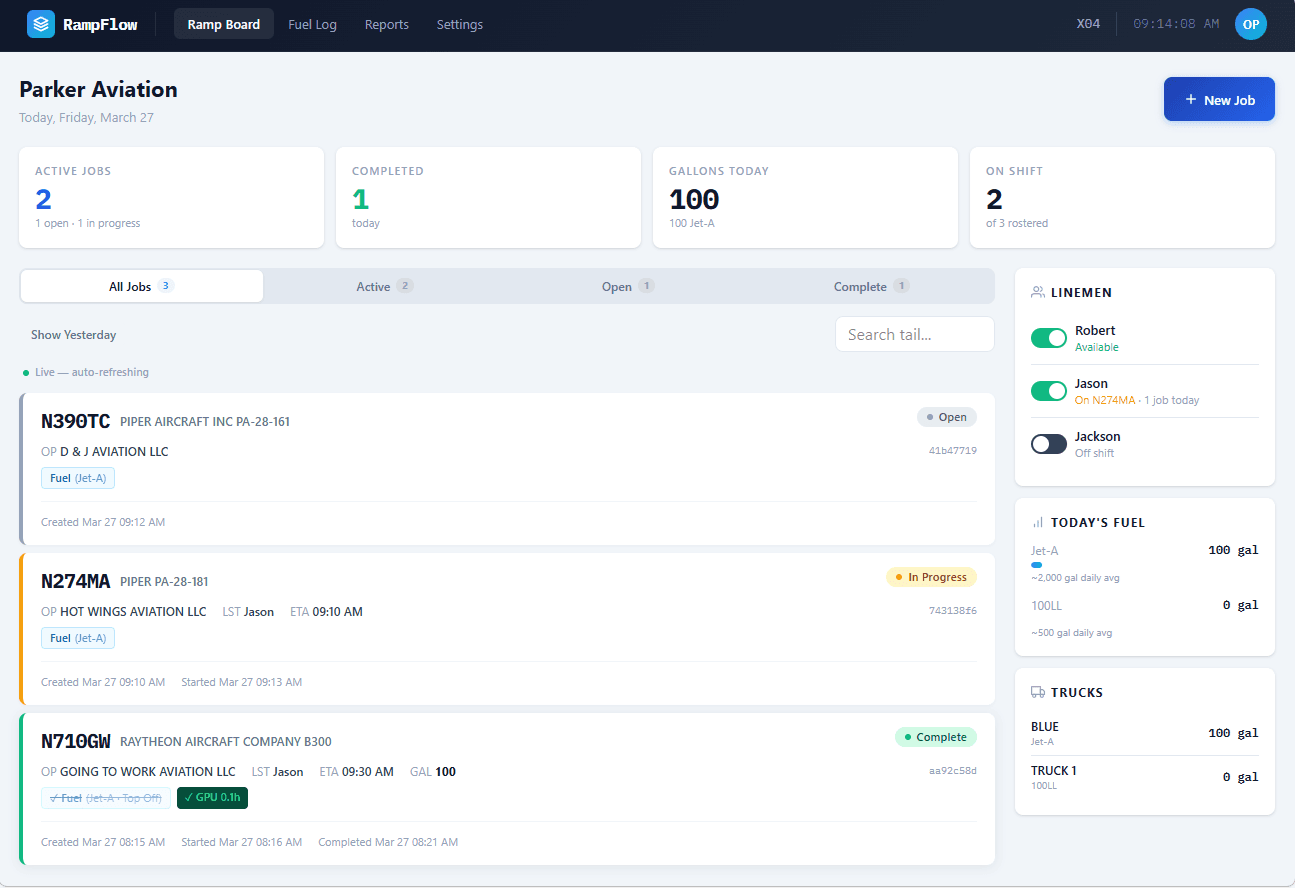
The full ramp board — exactly what your front desk sees, live.

rampflow.fbodesk.com/ramp
Fig. 1 — Live ramp board, desktop view

Fig. 1 — Live ramp board, desktop view

60
<0s
Job acceptance time
100
0%
Digital fuel capture
5
0 min
From signup to first job
$0
$0
Hardware required
Platform

Everything
your ramp
needs.

Built for the real conditions of FBO work — sunlight, gloves, wet hands, and no time for complicated software.

📋

Ramp Board

Live overview of all active, pending, and completed jobs. Front desk sees everything — no phone tag required.

📱

Mobile for Linemen

Large tap targets, high contrast, sunlight-readable. Accept jobs and capture fuel with one thumb on the ramp.

📷

AI Ticket Scanning

Photograph the fuel ticket. AI extracts every field — tail number, gallons, truck, product, times — in seconds.

Fuel Logging

Automatic truck registration, product tracking, two-ticket fueling support, and FAA aircraft lookup.

📊

Reports & Export

Filter fuel logs by date, aircraft, truck, or lineman. Export to CSV for accounting or compliance.

🔗

Integrations On Request

Already using FlightBridge, FBO One, or another system? Talk to us about custom integrations for your workflow.

Process

From dispatch
to done.

Four steps, zero paperwork. From arrival to fueled — tracked in real time without a single radio call.

01
Step 01

Front desk creates job

Enter the tail number, fuel type, and instructions. The ramp board updates instantly — every lineman sees the new job.

Takes under 30 seconds
02
Step 02

Lineman accepts

One tap to claim the job. Status updates to 'Accepted' — front desk knows who's on it without the radio.

Notification in under 60 seconds
03
Step 03

Fuel & capture ticket

Fuel the aircraft. Photograph the printed ticket. AI extracts all fields automatically — no typing, no errors.

AI capture in under 10 seconds
04
Step 04

Log saved, job complete

Fuel log saved with all data, gallons, truck, and times. Reports ready for export. Board clears, next job.

Full digital record, always
FD
Front Desk

Total
ramp
visibility.

  • Create and dispatch jobs in under 30 seconds
  • See live status of every fueling, every truck
  • No more radio calls to check job progress
  • Instant alerts when jobs are accepted or complete
  • Export fuel logs for accounting or compliance
  • Manage the entire team from one screen
LM
Linemen

Your job,
your
phone.

  • See all open jobs the moment they're created
  • One tap to accept — no radio, no clipboard
  • Sunlight-readable, large-button mobile UI
  • Photograph the ticket — AI does the typing
  • Works on any phone, no app install required
  • Built by people who've worked the ramp
Pricing

Simple. Honest. Flat.

No per-seat fees, no setup costs, no contracts. Start with a 14-day free trial — no credit card required.

Prop
$99
per month
Up to 3 team members · 1 location
  • Ramp Board (dispatch + live status)
  • Mobile lineman app
  • AI fuel ticket scanning
  • Fuel log with FAA aircraft data
  • CSV export
  • Email support
Start Free Trial
Jet — Most Popular
$199
per month
Unlimited team members · 1 location
  • Everything in Prop
  • Unlimited lineman accounts
  • Advanced reports & filtering
  • Priority support
  • Custom integrations on request
  • Early access to new features
Start Free Trial
Fleet
Custom
 
Unlimited team members · Up to 5 locations
  • Everything in Jet
  • Multi-location management
  • Consolidated reporting
  • Dedicated account manager
  • Custom onboarding & training
  • SLA & custom contract
Contact Us

Try RampFlow
free.

5-minute setup. Works on any phone. No hardware required.

No credit card required